
n8n
Open-source workflow automation · 325+ free templates
Self-host n8n for free, with no execution limits and your data on your own servers.
Connects to 900+ apps, plus any REST API through the HTTP Request node.
325+
Free templates
900+
Integrations
$0
Self-hosted cost
∞
Self-hosted executions
We imported and ran one template from every category
We self-hosted n8n 1.97.1 and imported one workflow from each of the 12 categories to check that it imports cleanly, matches its listed node count, and does what it claims. Screenshots are unedited exports from the editor, and any bug we hit is noted on the card.
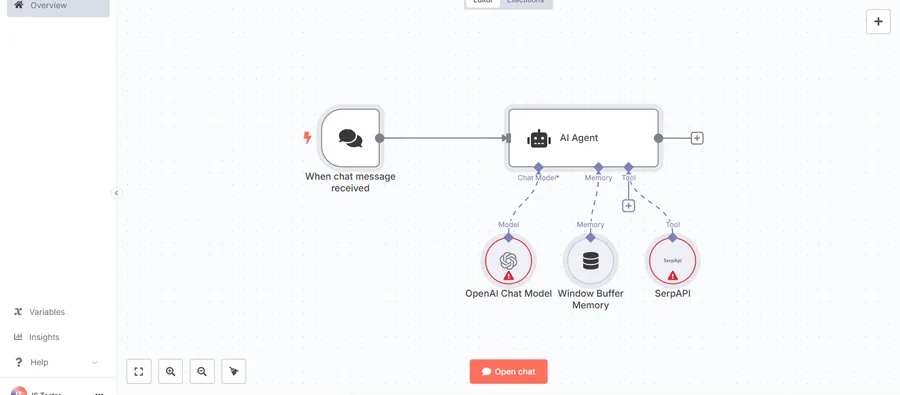
AI agent chat
Imported clean, 5 nodes exactly as listed. It's n8n's own reference AI Agent pattern: chat trigger → agent with a SerpAPI tool and window buffer memory attached. Good starting point if you've never wired up a tool-using agent in n8n before.
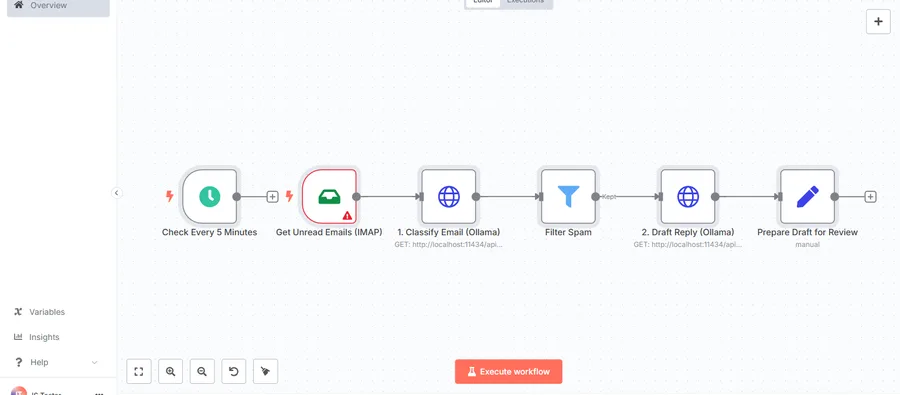
AI Email Auto-Responder with Ollama
The one template here we could run without any paid API key: it calls a local Ollama instance over plain HTTP Request nodes instead of n8n's official AI nodes, so there's nothing to pay for just to try it. Imports clean, 6 nodes.
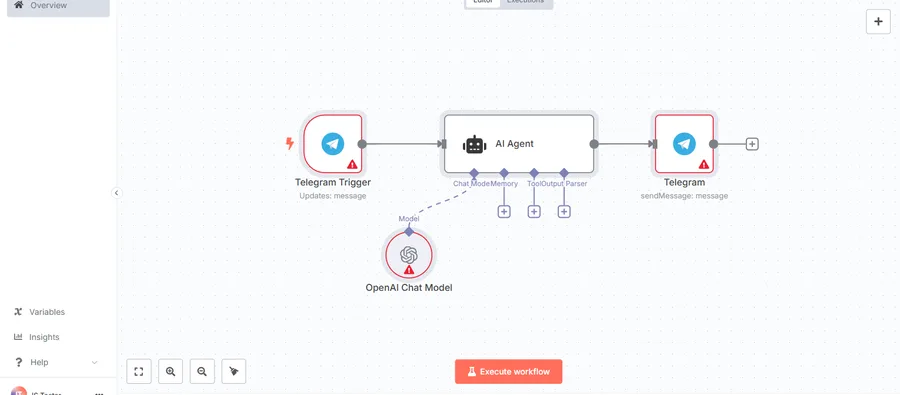
Chat with OpenAI's GPT via a simple Telegram Bot
Small and readable: Telegram Trigger → AI Agent → Telegram reply, with an OpenAI Chat Model feeding the agent. 4 nodes as advertised. Needs your own Telegram bot token and OpenAI key before the red credential warnings clear.
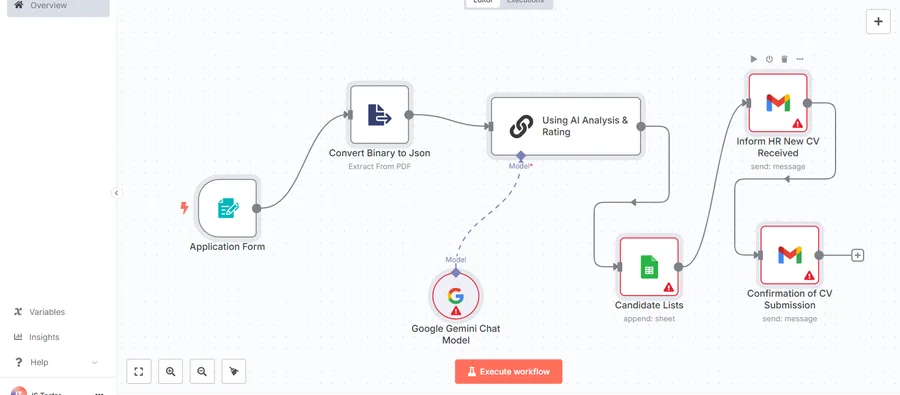
Screen Applicants With AI, notify HR and save them in a Google Sheet
A full applicant-screening pipeline: form → PDF-to-JSON → Gemini scoring → append to Sheet → two separate Gmail notifications (candidate + HR). 7 nodes, imported without errors.
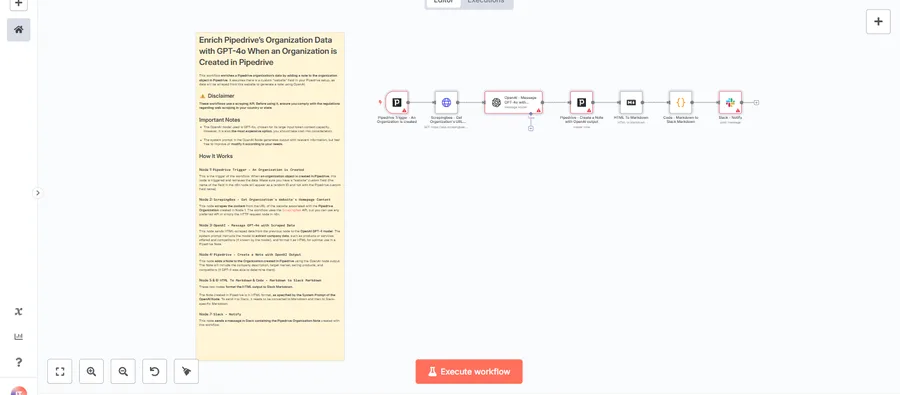
Enrich Pipedrive's Organization Data with OpenAI GPT-4o & Notify it in Slack
One of the better-documented community templates we opened: the sticky note on the canvas walks through all 8 nodes individually, including a cost warning about GPT-4o being 'the most expensive option.'
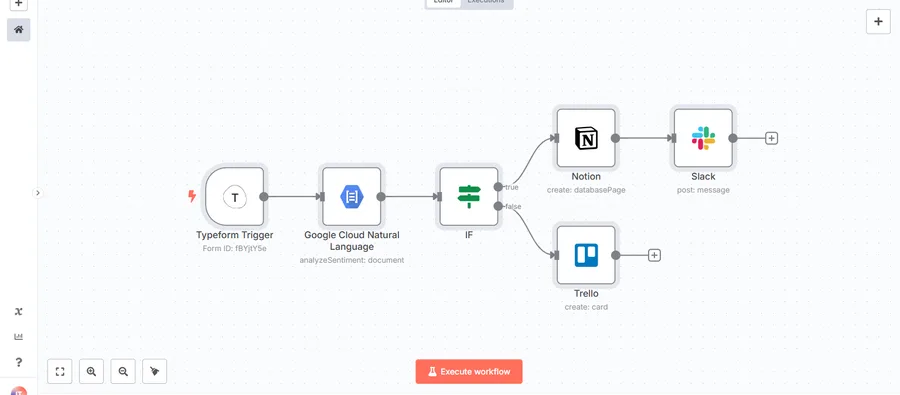
Add positive feedback messages to a table in Notion
Typeform submission → Google Cloud Natural Language sentiment check → IF branch → positive feedback to Notion + Slack, negative to Trello. 6 nodes, clean import, sensible branching logic.
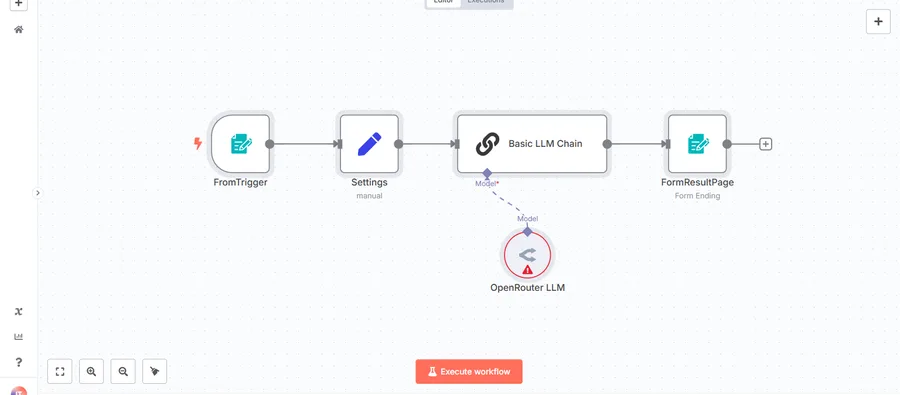
Extract license plate number from image uploaded via an n8n form
Compact vision pipeline: n8n form upload → Basic LLM Chain → OpenRouter as the model provider. 5 nodes. Worth knowing it routes through OpenRouter rather than OpenAI directly if you're tracking API costs.
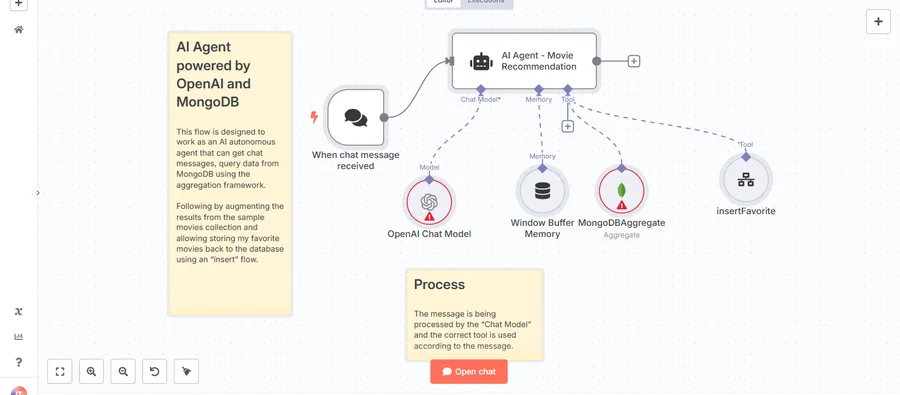
MongoDB AI Agent - Intelligent Movie Recommendations
Chat-triggered agent with two tools: a MongoDB Aggregate query and an insert-favorite action, plus window buffer memory. 8 nodes, and the canvas sticky notes explain the tool-selection logic clearly enough to adapt to your own collections.
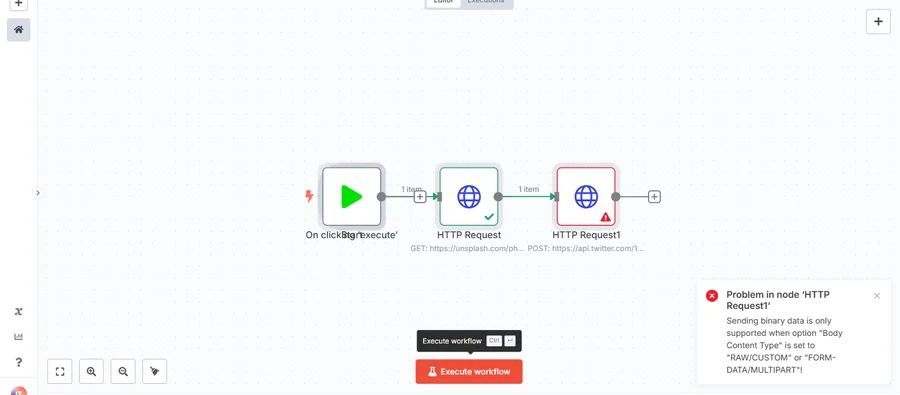
Update Twitter banner using HTTP request
The one template we executed as well as imported. The first node (a GET to Unsplash for a random photo) ran and succeeded with no credentials. The second node (the Twitter banner POST) failed with a reproducible n8n error: sending binary data requires Body Content Type set to RAW/CUSTOM or FORM-DATA/MULTIPART. The community template ships with the wrong setting, so change it before you rely on this workflow.
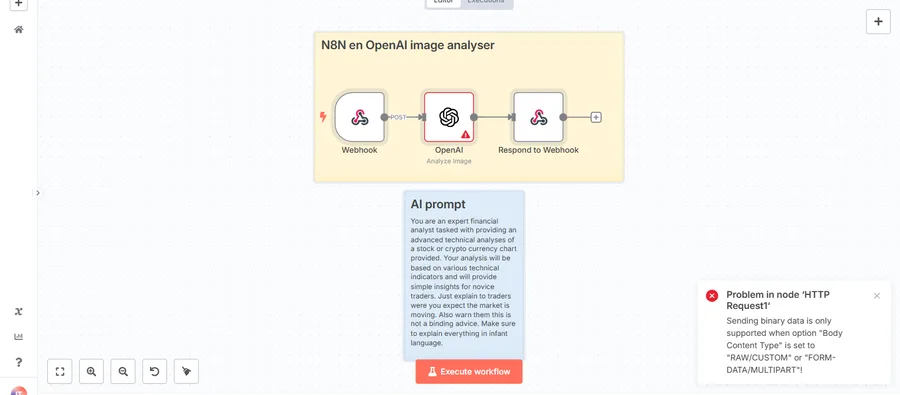
Analyze tradingview.com charts with Chrome extension, N8N and OpenAI
A webhook-triggered OpenAI vision call, 5 nodes total, with the full system prompt left visible in a sticky note on the canvas, including its explicit "this is not financial advice" disclaimer baked into the prompt itself.
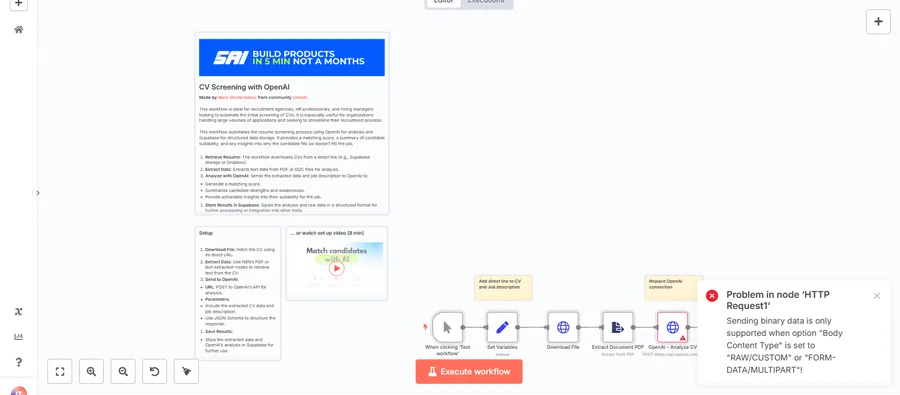
CV Screening with OpenAI
The most heavily documented template in our sample: 11 nodes, a branded intro panel, a written setup guide, and an embedded 8-minute setup video from the original creator. Imported without errors.
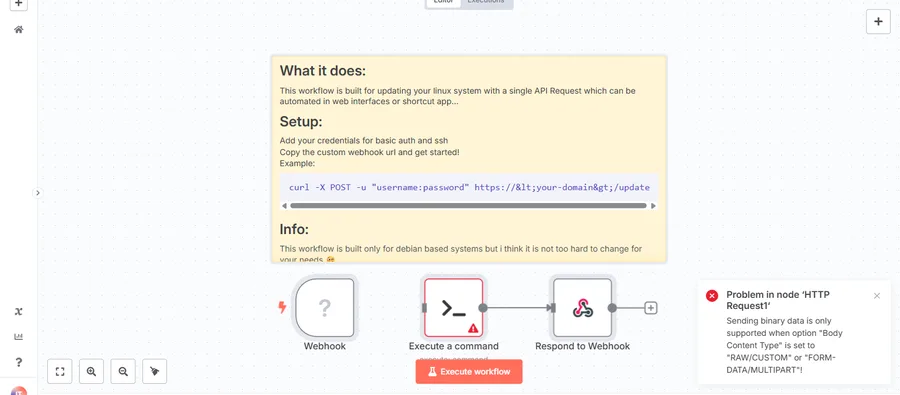
Linux system update via authenticated webhook
Deliberately minimal: webhook → shell command → response, 4 nodes, with a working curl example left on the canvas. The sticky note is upfront that it targets Debian-based systems only.
Browse 325+ n8n Templates
Search and filter free, ready-to-import n8n workflow templates by category.
What is n8n?
n8n is a fair-code, open-source workflow automation platform. Unlike Zapier or Make, you can self-host it on your own infrastructure with no execution limits and no usage fees. Its native AI nodes for OpenAI, Claude, Gemini, and LangChain let you build AI agents and RAG pipelines without custom code. Try n8n free →
Best for
- ✓ Developers and technical teams
- ✓ AI agents, RAG chatbots, LLM pipelines
- ✓ Self-hosted, on-premise deployments
- ✓ High volumes without per-execution fees
- ✓ Custom integrations via JavaScript or Python code nodes
Not ideal for
- ✗ Non-technical users who want zero setup
- ✗ Teams that need a fully managed SaaS
- ✗ Orgs that want to avoid Docker/server work
How to use n8n templates
- 1
Sign up for n8n
Start a free n8n Cloud trial, or self-host with Docker at no cost. Start free →
- 2
Download a template
Each template is a .json file. Pick any from the categories above.
- 3
Import into n8n
Go to Workflows → Import from File and select the JSON.
- 4
Add your credentials
Connect your accounts for each service used in the workflow.
- 5
Activate & run
Toggle the workflow on. It runs automatically on its trigger.
n8n vs Zapier vs Make
| Factor | n8n | Zapier | Make.com |
|---|---|---|---|
| Self-Hosted | ✓ Yes | No | No |
| Execution Limits | Unlimited* | Task-based | Ops-based |
| AI / LLM Nodes | ✓ Native | Limited | Limited |
| Open Source | ✓ Yes | No | No |
| Free Tier | Self-host free | 100 tasks/mo | 1,000 credits/mo |
| Ease of Use | Technical | Easiest | Moderate |
* Unlimited on self-hosted. Cloud plans have execution limits.
Frequently asked questions
What is n8n?
n8n is a free, open-source workflow automation platform. It can be self-hosted on your own servers or used as a managed cloud service. It supports 900+ integrations, AI-native workflows with OpenAI/Claude/Gemini, and has no execution limits on self-hosted plans.
Are there free n8n templates?
Yes. There are 325+ free n8n workflow templates available covering Gmail, Slack, Notion, Google Sheets, HubSpot, GitHub, HR automation, AI agents, RAG pipelines, and more. Templates are JSON files you import directly into n8n in one click.
Can I self-host n8n for free?
Yes. n8n is open-source and free to self-host. You can run it with Docker or on Kubernetes with no execution limits, no usage fees, and full control over your data.
What tools does n8n integrate with?
n8n integrates with 900+ tools including Slack, Gmail, HubSpot, Salesforce, Google Sheets, Notion, Airtable, GitHub, Stripe, PostgreSQL, OpenAI, Anthropic Claude, Google Gemini, and many more.
How do I use n8n templates?
Download any .json template file, then in n8n go to Workflows → Import from File and select the JSON. Configure credentials for the connected services, activate the workflow, and it runs automatically.
Is n8n good for AI automation?
Yes. n8n has native AI nodes for OpenAI, Anthropic Claude, Google Gemini, LangChain, and vector databases like Pinecone and Qdrant. You can build RAG chatbots, AI agents, document processing pipelines, and more without writing code.
Open source and self-hostable
Import your first n8n template
Try n8n Cloud free, or self-host with Docker in about 5 minutes with no execution limits.